|
Overview
A BIGGER
SCREEN MAKES VIEWING BETTER
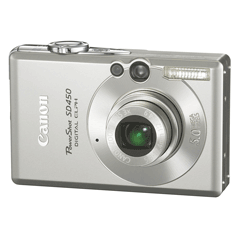
Similar in compact size and feature set to the popular
SD400, the PowerShot SD450 possess some substantial upgrades. Boasting
Canon’s 3x optical zoom lens and Canon's intuitive DiG!C processor, the
5.0MP PowerShot SD450 delivers remarkable pictures. And best of all, this
compact camera comes with several shooting modes and is easy to use, simply
point and shoot. Preview and review your memories on the large 2.5"
wide-angle LCD monitor. Then, connect the SD450 directly to any Canon Direct
Print, Bubble Jet Direct or PictBridge compatible photo printer and print
photos on the spot. With the Print/Share button direct printing and
downloading images to a computer is easier than ever.
Packed with features within a compact body, the
PowerShot SD450 makes it easy to take digital photography further.
Features
SUBSTANTIAL QUALITY IN ULTRA-SLIM STYLE
Substance and style. This powerful 5.0 Megapixel Digital ELPH features a 3x
Optical Zoom lens with UA Lens Technology and is packaged in a sleek,
stainless steel body.
High-performance specs give PowerShot SD450 Digital ELPH
the substance to match its sleek stainless steel style. A 5.0 Megapixel CCD
captures all the detail you need to create rich, vibrant prints of any size.
The genuine Canon 3x optical zoom lens gets you in close, while UA lens
technology provides exceptional brightness and clarity in the ultra-thin
lens.
The
PowerShot SD450 Digital ELPH's UA Lens features a glass-molded aspherical
design with an ultra-high refractive index. The advantage? You get
exquisitely accurate images from a lens that’s compact enough to fit in a
super-slim camera body.
BETTER SHOTS, EASIER REPLAY
Large
2.5” LCD screen and optical viewfinder for easy on-camera viewing.
Though its body is superbly slim, the PowerShot SD450
Digital ELPH has an oversized 2.5” LCD screen that makes it easy to frame
and play back your scene. The SD450 Digital ELPH also has an optical
viewfinder to enable you to capture your memories even in the sunniest of
situations. And when you're shooting at dusk or at night, the Night Display
function lets you see the display clearly. It brightens the object by
reducing the frame rate on the LCD screen.
CANON
TECHNOLOGY MAXIMIZES QUALITY AND PERFORMANCE
DIGIC
II Image Processor for even faster processing speed, crisp vibrant colours
and excellent image quality.
The PowerShot SD450 Digital ELPH incorporates Canon's
DIGIC II Image Processor. Designed to improve processing speed and image
quality, the DIGIC II Image Processor provides markedly faster camera
startup, autofocus and playback plus it assures that every image is more
colourfully vibrant.
SELECTABLE MOVIE RECORDING SPEEDS
Shoot
your own high-quality movies with Fast Frame Rate Movie Mode. Now you can
reel them in at 60 fps (320 x 240) or 30 fps (640 x 480).
The PowerShot SD450 Digital ELPH lets you shoot in 60 fps
full motion video to easily capture fast moving subjects. Plus, you have the
option of 30 fps for general shooting. For movies small enough to attach to
an email, select the compact movie setting.
EXPAND THE CREATIVE IDEAS
15
Shooting Modes to capture every situation including Canon’s original My
Colors Mode for customization while shooting.
With the PowerShot SD450 Digital ELPH, you can count on
exact focus no matter where your subject is in the frame. You've got
Shooting Modes including Special Scene Mode that give you breathtaking,
exhilarating pictures even when shooting conditions are tough. And you can
both customize colour reproduction and "touch up" colour while you’re
shooting! Lighten skin tones, make the sky a more vivid blue, emphasize a
single colour and much more, all in real time as you monitor results on the
LCD screen.
Auto
The camera chooses all the settings so you can
concentrate on your subject.
Manual
The ultimate in creative control, you set ISO speed,
exposure compensation and white balance.
Portrait
The camera sets a large aperture, focuses the subject and
artistically blurs the background to make your subject "pop."
Foliage
Capture brilliant shots of autumn foliage, greenery or
blossoms.
Snow
Shoot clear snow scenes without darkened subjects and
bluish tint.
Beach
Get clear shots of people at a sunny beach without the
darkened faces.
Fireworks
Grab brilliant images of skyrocketing fireworks.
Underwater
Capture underwater images with reduced backscatter
effect.
(Note: Optional Waterproof Case AW-DC50 required for
shooting any underwater images)
Indoor
Reduces blur and improves colour accuracy when shooting
handheld indoors.
Kids
& Pets
Reduced time lag freezes fast-moving subjects so you
won't miss those special shots.
Night
Snapshot
Get natural looking pictures with brighter backgrounds
and subjects lit by flash.
Digital Macro
Shoot larger-than-life close-ups with one-button
simplicity.
Stitch Assist
Build inspiring panoramas by neatly aligning sequential
images.
Movie
Shoot in VGA (30 fps), QVGA (15 fps), QVGA (60 fps up to
1 min.) or QQVGA (15 fps up to 3 minutes video).
My
Colors
Positive Film
Combine “Vivid Red”, “Vivid Green” and “Vivid Blue” to
achieve a positive film effect.
Lighter Skin Tone
Make your subjects’ skin tones paler.
Darker Skin Tone
Darken skin tones a shade.
Vivid Blue
Emphasize the sea, sky, or other blue areas.
Vivid Green
Add vivid dimension to greens for extraordinary nature
shots.
Vivid Red
Charge up red objects in your images for extra impact.
Color Accent
Choose to retain a single colour in your image while
other colours turn monochrome.
Color Swap
Select a colour and replace it with a colour you specify
for special effects.
Custom Color
Set balance of red, green, blue and skin colours; finely
adjust brightness and vividness.
FASTEST PERFORMANCE STANDARD
USB
2.0 Hi-Speed interface for faster downloads and image transfers.
PowerShot SD450 Digital ELPH supports the USB 2.0
Hi-Speed standard, so you'll enjoy the highest possible data transfer speeds
when using a USB 2.0 compatible computer. The camera's performance level is
high enough to take full advantage of super-high-speed SD memory cards as
well.
THE
COMPLETE PRINT SOLUTION
Print/Share Button for easy direct printing and downloading plus ID Photo
Print and Movie Print with Canon CP and SELPHY Photo Printers
The PowerShot SD450's Print/Share button makes direct
printing easier than ever. Simply connect the SD450 to a Canon CP, SELPHY or
PIXMA Photo Printer or any PictBridge compatible photo printer, press the
lighted Print/Share button and print! Also use the Print/Share button to
transfer images directly to a computer (Windows® and Macintosh®).
Specifications |